I use AI tools every day, for things that have nothing to do with each other. One week it’s a publishing pipeline, the next it’s a Twitter monitor that catches airline disruptions, the next something completely unrelated. For a long time my “system” was no system: open a new chat, do the thing, move on. It worked fine until it didn’t.
These days all of that lives in Obsidian. It’s become my second brain. In this post I’ll show how it works, share the small commands that do the heavy lifting, and answer two questions I had myself: does it matter which AI model writes the notes, and is any of this locked to one AI tool?
The Messy Way I Used to Work
Here’s a pattern a lot of people fall into. You open one chat for a project and keep it running for weeks, compacting it every few messages. That’s the feature where the AI summarizes the conversation so far so it can keep going without hitting the length limit.
If that works for you, let it be. For me, it wasn’t the best option. I had unrelated things running at once, so I ended up with dozens of separate chats instead. And that’s where it fell apart:
- I’d lose track of which chat had which conversation.
- Sometimes I couldn’t find the right one, so I’d re-explain the whole backstory from scratch.
- Sometimes I’d forget a chat existed at all and later make a decision that quietly contradicted something I’d already worked out weeks earlier.
None of this was the AI’s fault. My work just doesn’t fit into one long thread, and pretending it did was never going to work.
Building an Actual Second Brain
The idea isn’t mine. I first saw it in something Andrej Karpathy described: instead of letting your chat history become a graveyard of disconnected conversations, keep a living wiki that the AI both reads from and writes to. I built my own customized version of it in Obsidian.
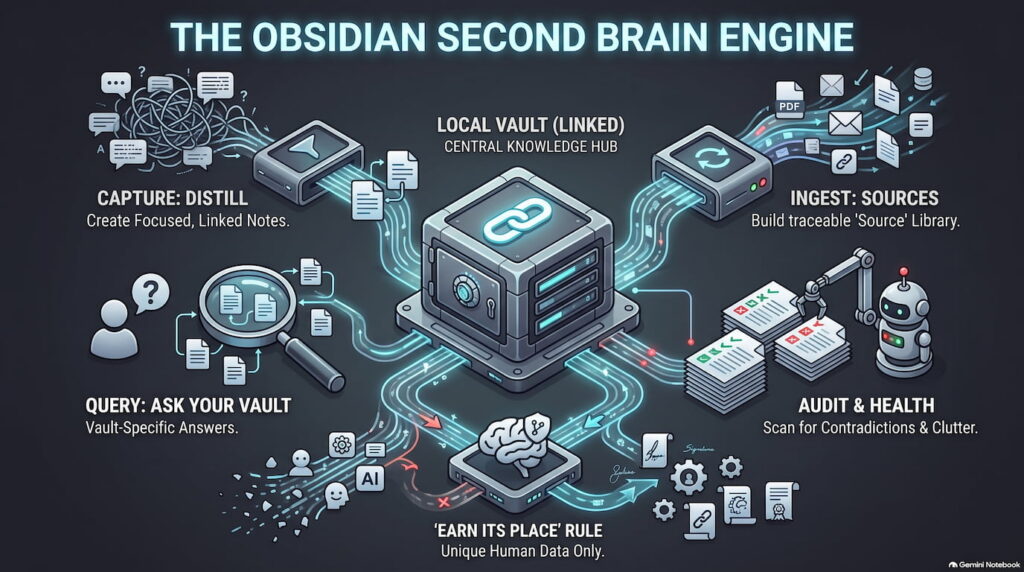
The short version: every session gets distilled into small, focused notes, one idea per note, written to stand on its own; and those notes link to each other. Obsidian itself is just a nice viewer over a folder of plain text files, which matters more than it sounds. I’ll come back to that.
Never used Obsidian? Setup is genuinely two minutes.
Download it free from obsidian.md (no account needed), open it, click “Create new vault” or “Open folder as vault” if you already have a folder of notes. Pick a location on your computer (or shared cloud folder), done. That’s the whole install. Everything in this post is just text files inside that folder; Obsidian’s job is to display them nicely and let you click between them.
The vault has a simple shape:
My Notes · Vault Structure
My Notes/
         ├── rules.md      # the rulebook the AI follows every session
         ├── index.md      # every note, listed by category
         ├── log.md        # append-only history of what the AI did
         ├── raw/          # original files I feed in (articles, PDFs) never edited
         └── wiki/
             ├── sessions/  # one note per AI conversation
             ├── sources/   # one summary note per file in raw/
             ├── concepts/  # ideas and methods
             ├── entities/  # people, tools, companies
             └── syntheses/ # good answers filed back in as notes
The rulebook is the heart of it. It tells the AI what each folder is for, what a note looks like, and most importantly, the rules for writing them. The AI reads it at the start of every session, so every session plays by the same rules.
The Capture Command
This is the part that makes the whole thing sustainable, so it’s worth spelling out. If you copy one thing from this post, copy this!
At the end of a session I type one command: /capture. In Claude Code that’s a “slash command,” which is nothing fancier than a text file with instructions the AI runs when I call it. Mine tells the AI to write a session note (what we did, what we decided, what’s next), distill the reusable ideas into their own notes, link everything together, and update the index and the log. No transcripts. The raw chat stays in the tool, the vault only gets the distilled version.
The one rule that matters most, I actually learned while writing this post. I asked Claude to review my own capture prompt, and it found a gap: my instruction said “any reusable idea gets its own note.” Sounds fine, but “any” gives the AI no bar to clear. And I know because it happened: when I then audited the whole vault, I found encyclopedia stubs: a note explaining a 1945 invention, pages restating my own rulebook. All from day one, before the rule existed. Useless. The AI already knows all of that. So the rule became:
The bar every note must clear: it records something specific to me – a decision, a preference, a constraint, a fact about my setup -* that a fresh AI wouldn’t already know. General knowledge never gets a note. Each session produces zero to four notes, and zero is fine.
*(not an em dash, added by a human!)
Here’s a generic version of my capture instructions you can steal:
capture.md · Steal This Prompt
When I run /capture:

1. Write a session note in wiki/sessions/YYYY-MM-DD-topic.md:
   what we did, decisions made (each with its one-line why), next steps,
   open threads.

2. Distill atomic notes, selectively. An idea only gets its own note if:
   a) it's specific to me, a decision, preference, constraint, or fact
   about my setup that a fresh AI wouldn't already know (general knowledge
   never gets a note), AND
   b) I'll plausibly need it again outside this session.
   Check index.md first. Update an existing note instead of creating a duplicate.
   Most sessions produce 0–4 notes. Zero is fine.

3. Cross-link the session note and the atomic notes to each other.

4. Update index.md and append one line to log.md.

5. Distilled notes only, never a transcript.
Doesn’t this blow up the AI’s context?
Attaching my vault makes the notes accessible, not automatically loaded. The AI uses an index to find and read only the few notes relevant to each question, so the cost depends on the question, not the vault’s size.
Capture Isn’t the Only Way In
Capture is the daily habit, but the vault runs on four commands, and they’re all just saved prompts:
| Command | What it does | When it runs |
|---|---|---|
/capture |
Distills the session into linked notes: what we did, what we decided, what’s next | End of every session |
/ingest |
Reads a file dropped into raw/, writes a summary note, links it to everything related |
When knowledge arrives as a file, not a chat |
/query |
Answers “what do my notes say about X?” with links to the notes behind the answer | Whenever I need to check something before deciding |
/lint |
Scans the whole vault for contradictions, stale claims, duplicates, and orphan notes | Monthly, on a schedule and it only reports |
Ingest deserves the extra word, because it’s for knowledge that lives in a file instead of a conversation. The AI reads the file, writes a summary note, and connects it to every related note. The original never gets edited, so any claim in the wiki can be traced back to where it came from. I’ve mostly used it for meeting notes (mine come out of Granola, an AI notetaker), but anything you can save as text qualifies:
- The Slack thread where a decision actually got made,
- An email back-and-forth with a vendor,
- A report someone sent you,
- An article you want to keep.
If it matters and it’s text, it can join the brain.
Query has a side effect I didn’t expect to like this much: good answers get filed back in as notes of their own, so even asking questions makes the wiki richer.
And lint is the health check. The audit that found my day-one encyclopedia stubs was exactly this. I’ve now put it on a monthly schedule, and it only reports; I stay the one who approves fixes.
The pattern is the same every time: the vault is the thing that lasts, and each command is just a text file telling the AI how to maintain it.
What’s Worth Feeding It
Once ingest clicks, you start seeing candidates everywhere. Meeting notes are the only ones I’ve made a habit of so far. The rest of this list is where I see it going, at work and at home.
| Where | What to feed it | Why it earns a place |
|---|---|---|
| Work | Project docs at handoff: PRDs, briefs, specs | Ingest them when a project starts, and the vault knows the requirements for every future session about it |
| Work | Post-mortems and incident writeups | The “why did this break and what did we decide” knowledge that otherwise gets re-learned the hard way a year later |
| Work | User research: interviews, surveys, support tickets | Each one is a file; the wiki accumulates what customers keep saying across all of them |
| Work | Data you analyzed once | The spreadsheet isn’t the value, the verdict is: “we checked this in March, the answer was no, here’s why” |
| Work | Onboarding packs | Feed in the key docs on day one and your AI is caught up before you are |
| Personal | Contracts and policies: lease, insurance, warranties | “Does my policy cover X?” becomes a question you ask, not a PDF you hunt for |
| Personal | Books and courses | Chapter notes that link into everything else you know, instead of a highlights file you never reopen |
| Personal | Podcast and YouTube transcripts | The two useful ideas from a 90-minute episode, captured, linked, and findable |
The filter is the same one capture uses: feed it things whose conclusions you’ll need again, not things you could re-Google. A Slack thread qualifies because the decision inside it exists nowhere else. A generic tutorial doesn’t; any AI can regenerate it on demand.
Keep in mind this is curated memory, not a data warehouse; most sessions add zero to four notes, and general knowledge never gets a page because the AI already knows it. Missing data isn’t a failure here, it’s just noise.
What Actually Changed
Not that I stopped forgetting things, I still do. It’s that forgetting stopped mattering. Whatever I’m working on, the AI pulls from the whole wiki, not just the one conversation I happen to be in (in practice: whichever project I start a session in, I attach the vault folder too, so it’s always in reach). And a few times now it has reminded me of something I’d forgotten myself – a decision I’d made, a reason I’d ruled something out – before I repeated the same mistake. That’s the part that sold me.
Does the Model Even Matter?
I use a strong model (Opus or Fable) for the session itself, the thinking part. But capturing is a separate step. Does it need an expensive model too, or is a cheaper, faster one like Haiku or Sonnet good enough?
Short answer: cheaper is usually fine, because it’s a different kind of task.
| Step | Model tier | Why |
|---|---|---|
| The session, the actual work | Strong (Opus, Fable) | This is where the thinking happens: working through the problem, making the decisions |
| The capture, the write-up | Cheap and fast (Haiku, Sonnet) | Capturing isn’t thinking, it’s noticing: what mattered, what’s worth keeping, how to say it in one clean sentence |
Two caveats. Very long sessions can bury the one detail that mattered, and a weaker model is more likely to flatten it into something generic. And connecting new notes to the right existing ones takes a better grasp of everything already in the wiki. So my rule: best model for the work, cheap model for the write-up, as long as your capture instructions are specific about what deserves a note. If the notes start reading flat and generic, that’s your signal to bump the model back up.
Is This Claude-Only?
No! And this is my favorite property of the whole setup.
The vault is a folder of plain markdown files. No database, no plugin doing magic, nothing tied to one vendor. Any AI tool that can read and write files on your computer can maintain it: Claude Code, OpenAI’s Codex, Antigravity 2.0, Cursor, pick yours. The only Claude-specific detail in my setup is a filename: Claude Code automatically reads a file called CLAUDE.md at the start of every session, so that’s what my rulebook is named. Other tools have their own equivalent (many read AGENTS.md), or you simply tell them “read rules.md first.”
Same goes for the capture command. A “slash command” sounds tool-specific, but it’s literally a prompt saved in a text file, and every serious tool now has some way to save reusable prompts. Worst case, keep the capture instructions as a note inside the vault itself and end your sessions with “open capture.md and do what it says.”
The one setup that doesn’t work well: browser-only chatbots with no file access. They can read whatever you paste, but they can’t maintain the vault for you and the maintenance is the whole point.
This is also the quiet argument for doing it at all.
If You’re Thinking About Doing This
You don’t need Obsidian specifically. The real shift is small: stop treating AI conversations as disposable, and start treating each one as an entry in something that grows. Everything else is plumbing.
If you build something similar, I’d like to hear how you’re doing it, reach out.